ESP32 or Raspberry Pi: the honest decision framework covering real-time control, power budgets, AI workloads, connectivity and total cost of ownership.
- Introduction & Use‑Case Categorization
- Categorizing Development Scenarios
- What is ESP32?
- What is Raspberry Pi?
- ESP32 vs Raspberry Pi: Key Differences
- Technical Comparison Table with Quantified Performance Metrics
- Real‑World Case Studies: When to Choose Which Board
- Case Study A: Ultra‑Low Power Environmental Monitoring (ESP32 Win)
- Case Study B: AI Vision Security System (Raspberry Pi Win)
- Case Study C: Hybrid Industrial Gateway (Both Boards)
- Power Consumption: The Efficiency Factor
- Quantifying Performance: Formulas for Embedded System Design
- 1. Battery Life Estimation (ESP32 Advantage)
- 2. Real-Time Latency & Jitter (ESP32 Advantage)
- Best Use Cases Based on Power Consumption:
- Troubleshooting Development Challenges: Expert Fixes
- ESP32 Common Issues & Fixes
- Raspberry Pi Common Issues & Fixes
- Choose ESP32 if:
- Choose Raspberry Pi if:
- Industry Standards, Protocols, and Compliance
- Wireless & IoT Protocol Standards
- Operating System and Hardware Compliance
- Final Thoughts
- FAQ
- Related guides in this track
- Practical example
- Where to go next
- Frequently asked questions
If you need a full OS, AI/ML, multimedia, or a local server/dashboard Raspberry Pi 5.In the world of electronics and DIY projects, two of the most popular devices that enthusiasts, developers. Hobbyists alike encounter are the ESP32and the Raspberry Pi . These two boards have become go‑t o solutions for everything from building small IoT devices to creating full‑scale home automation systems, robotics, and even personal computers.Which one is right for your project?In this comprehensive guide, we will dive deep into the difference between ESP32 and Raspberry Pi , offering a thorough comparison based onkey features, applications, performance, and power efficiency. This post is designed to help both beginners and experienced developers make an informed decision when choosing between the ESP32 and Raspberry Pi for their next project.
- ESP32 vs. Raspberry Pi 5: 2. Quick Verdict: Which One Should You Buy?3. Core Architecture: MCU vs. SBC Explained 4. Technical Benchmarks: Processing Power & RAM 5. Power Efficiency: Deep Sleep vs. High Performance 6. I/O and Real-Time Control (Jitter & Determinism) 7. Connectivity: Wi-Fi 6, Bluetooth, and PCIe 8. Software Ecosystem: Arduino/MicroPython vs. Linux 9. Reliability Concerns: Brown-outs vs. SD Card Corruption 10. Final Decision Matrix for Your Project 11. Frequently Asked Questions (FAQs) I tested both boards in a home automation prototype. An ESP32 sensor network feeding a Raspberry Pi‑based local dashboard and occasional TensorFlow Lite inference. The ESP32 handled sensor sampling, BLE/Wi‑Fi telemetry, and months‑long battery life. The Raspberry Pi hosted the dashboard, performed heavier data aggregation, and ran the camera‑based detection reliably. From hands‑on use, ESP32 is the practical choice for distributed, low‑power nodes. Raspberry Pi (now Pi 5) is the right choice for edge servers and vision/AI tasks.
Introduction & Use‑Case Categorization
The choice between the Raspberry Pi (a full single‑board computer, or SBC) and the ESP32 (a powerful microcontroller, or MCU) boils down to a fundamental trade‑off: processing power vs. power efficiency and real‑time control. The Pi runs a full Operating System (OS) like Linux, making it ideal for high‑level computing tasks (like web serving or computer vision). The ESP32 runs lightweight, custom firmware, excelling at direct, low‑latency hardware control.
Categorizing Development Scenarios
- Ultra‑Low Power IoT Devices: Requires minimal current draw and deep sleep capability. ( ESP32 wins)
- High‑Resolution AI/ML & Computer Vision: Needs high RAM and multi‑core processing power. ( Raspberry Pi 5 wins)
- Industrial Real‑Time Control: Requires predictable, non‑jittery I/O timing. ( ESP32 wins)
- Hybrid Edge Computing & Gateway: Needs both real‑time data collection and server capabilities. ( Both in tandem)
What is ESP32?
The ESP32 is a powerful microcontroller developed by Espressif Systems. It is designed to be an affordable and efficient solution for embedded systems, offering built-in Wi-Fiand Bluetooth connectivity. Makes it ideal for Internet of Things (IoT) applications. The ESP32 is built around adual-core processor and provides extensive I/O options, including GPIO pins, PWM, ADC, and DAC capabilities.
If you’re just getting started withelectronics or want to understand how basic circuits work, learning aboutlogic gates and their truth tables can be a great foundation before diving into microcontrollers like the ESP32 or computers like the Raspberry Pi.!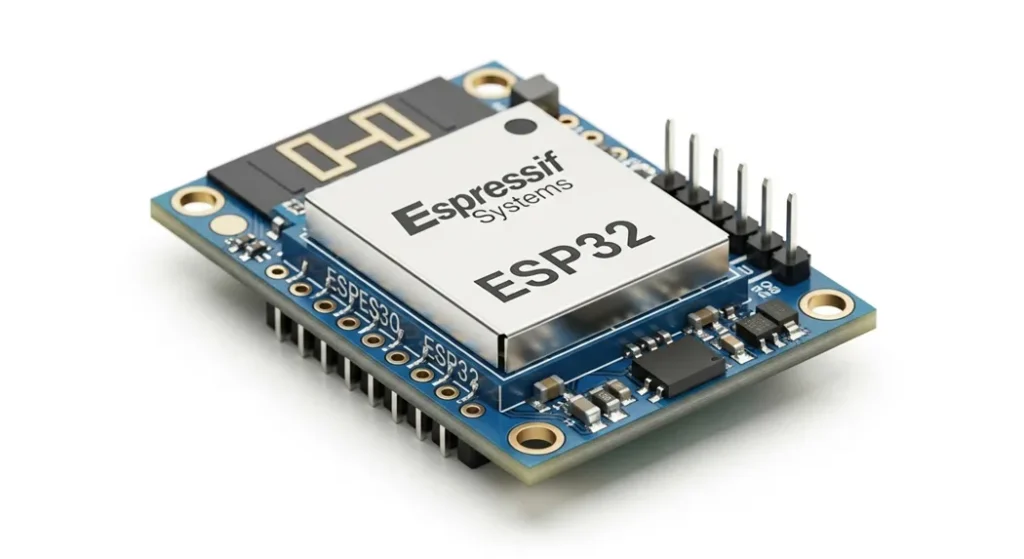
Key Features of ESP32:
- Dual-core processor with clock speeds up to 240 MHz.
- Built-in Wi-Fiand Bluetooth connectivity, supporting both Bluetooth Classic and BLE (Bluetooth Low Energy).
- Ultra-low power consumption, making it ideal for battery-powered projects.
- Multiple I/O options, including GPIO pins, Pulse Width Modulation (PWM), Analog to Digital Converters (ADC), Digital to Analog Converters (DAC), and much more.
- Compact size with a wide variety of development boards and modules available for various applications.
- Open-source support with extensive libraries and development environments such as the Arduino IDE and ESP-IDF.
The ESP32 shines in applications that require wireless connectivity, low power consumption, and minimal physical space. Its versatility in interfacing with sensors, motors. Other hardware makes it an excellent choice for IoT systems, wearable devices, home automation, and environmental monitoring projects.
What is Raspberry Pi?
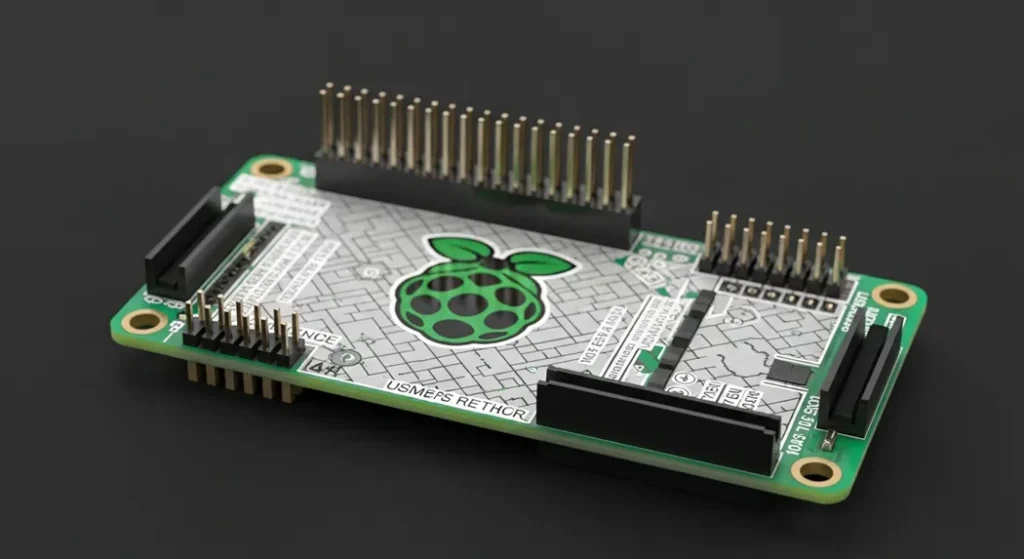
The Raspberry Pi , on the other hand, is a full-fledged single-board computer (SBC) that runs a complete operating system (OS), usually Raspberry Pi OS(formerly known as Raspbian). Unlike the ESP32, which is a microcontroller, the Raspberry Pi provides a more robust computing platform capable of running multiple applications simultaneously and interacting with external peripherals like USB devices, displays, and even cameras. This makes the Raspberry Pi an ideal choice for projects that require more processing power and the ability to run applications such as web servers, media centers, and educational tools.
Key Features of Raspberry Pi:
- Broad processing power, with models evolving from Pi 4 to Raspberry Pi 5.Multiple USB ports(including USB 3.0),HDMI output, and Ethernet connectivityon select models.Runs a full OS , allowing users to install and run complex software such as web browsers, programming environments, and media players.Expandable storage through a microSD card (or USB storage d evices), enabling large file storage and data processing.Wide range of GPIO pins for hardware interfacing, suitable for r obotics, home automation, and educational experiments.Large community support and comprehensive documentation, making it easy to find tutorials, solutions, and software libraries. The Raspberry Pi is perfect for projects that require more computational power, such as running media servers, creating personal computers, learning programming, and building advanced automation systems.
- Broad processing power, with models evolving from Pi 4 to Raspberry Pi 5.
- Multiple USB ports(including USB 3.0),HDMI output, and Ethernet connectivity on select models.
- Runs a full OS, allowing users to install and run complex software such as web browsers, programming environments, and media players.
- Expandable storage through a microSD card (or USB storage devices), enabling large file storage and data processing.
- Wide range of GPIO pins for hardware interfacing, suitable for robotics, home automation, and educational experiments.
- Large community support and comprehensive documentation, making it easy to find tutorials, solutions, and software libraries.
ESP32 vs Raspberry Pi: Key Differences
| Feature | ESP32 | Raspberry Pi 4 | Raspberry Pi 5 |
|---|---|---|---|
| Type | Microcontroller with built‑in Wi‑Fi and Bluetooth | Single‑board computer with a full OS | Single‑board computer with a full OS and improved I/O |
| Processor | Dual‑core, up to 240 MHz | Quad‑core ARM Cortex‑A72, up to 1.5 GHz | Quad‑core ARM Cortex‑A76, up to ~2.4 GHz |
| Operating System | Bare‑metal or custom firmware | Full OS (Raspberry Pi OS, Ubuntu) | Full OS (Raspberry Pi OS, Ubuntu) with better performance |
| Connectivity | Wi‑Fi, Bluetooth | Wi‑Fi, Bluetooth, Ethernet | Wi‑Fi (faster), Bluetooth 5.x, Ethernet, PCIe support |
| I/O Pins | Numerous GPIO (PWM, ADC, DAC) | GPIO pins (fewer than ESP32) | GPIO pins with improved peripheral bandwidth |
| Power Consumption | Very low | Higher than ESP32 | Higher than ESP32; efficiency improved vs Pi 4 |
| Use Case | IoT, embedded systems, battery devices | Home automation, education, media centers | Edge servers, AI/ML prototyping, multimedia |
Technical Comparison Table with Quantified Performance Metrics
Beyond raw specifications, engineers compare these boards using quantifiable metrics that define power efficiency and control latency.
| Feature / Metric | ESP32 (MCU) | Raspberry Pi 4 (SBC) | Raspberry Pi 5 (SBC) |
|---|---|---|---|
| Power Consumption (Avg. Active) | P=V×I: ≈ 0.25 W (80 mA @ 3.3V) | P=V×I: ≈ 4.0 W (800 mA @ 5V) | ≈ 5.0 W (varies with load; improved efficiency vs Pi 4) |
| Deep Sleep Current | ≈0.01mA(Critical for battery life) | N/A (No true Deep Sleep mode) | N/A (No true Deep Sleep mode) |
| Real‑Time Control Latency | Deterministic, Low Jitter (10 ms loop time) | Non‑Deterministic, High Jitter (OS interference) | Non‑Deterministic, improved I/O bandwidth but still OS scheduler |
| Memory (Primary) | 520KBSRAM (Limited) | 2-8GBLPDDR4 | 4-8GBLPDDR5 (model dependent) |
| I/O Protocol Support | |||
| Optimized for I2C, SPI, UART, PWM (Direct Hardware Control) | GPIO via kernel driver (Slower, not real‑time) | GPIO via kernel driver; PCIe and improved peripheral bandwidth | |
| --- | --- | ||
| General CPU Speed | Raspberry Pi 5 (Much faster) | ||
| Power Efficiency | ESP32 (Ultra low power) | ||
| Real‑time Performance (e.g., sensors) | ESP32 | ||
| Full OS, Browsing, App Development | Raspberry Pi 5 | ||
| Budget IoT Projects | ESP32 | ||
| Light Linux‑based automation (headless) | Raspberry Pi Zero 2 W | ||
| AI/ML and Computer Vision | Raspberry Pi 5 |
When it comes to raw performance, the Raspberry Pi family takes the lead with higher clock speeds and more RAM. The ESP32 remains the best choice for deterministic, low‑latency embedded tasks. Comes to raw performance, the Raspberry Pitakes the lead with itsquad-core processorandhigher clock speeds. Can go up to 1.5 GHz in the latest models. This gives the Raspberry Pi the ability to run a full operating system and handle complex tasks, including web browsing, media streaming, and server hosting.
However, the ESP32 is not far behind when it comes to real- time processing. With itsdual-core processorrunning at 240 MHz, the ESP32 can handle many real-time tasks, such assensor data collection,communication via Wi-Fi and Bluetooth.actuator control , with low latency and minimal resource consumption. The key difference here is that the ESP32 does not run a full operating system and is optimized for specific tasks with custom firmware, making it an ideal candidate for embedded applications.Practical Use Cases: - ESP32: Ideal for IoT projects where you need to collect and send sensor data to a cloud server or another device, with low power consumption and real-time response.
- Raspberry Pi : Great for projects that require runningfull applications or services, such as setting up ahome media server, building aweb server, or creating aneducational tool for programming and learning.
Real‑World Case Studies: When to Choose Which Board
The practical application defines the winner.
Case Study A: Ultra‑Low Power Environmental Monitoring (ESP32 Win)
A smart agriculture project requires a sensor node to measure soil moisture and temperature every 30 minutes, transmitting data via Wi‑Fi. Running on a solar‑charged battery for six months. The ESP32 is chosen because its Deep Sleep Mode minimizes the average current draw to 1 mA, making the project feasible. The Raspberry Pi’s continuous background processes and high idle power consumption would drain the battery in days.
Case Study B: AI Vision Security System (Raspberry Pi Win)
A smart security camera needs to capture 1080p video, run a TensorFlow Lite object detection model, and save filtered video clips. The Raspberry Pi 5 (or Pi 4 for smaller budgets) is mandatory due to multi‑GB RAM, improved GPU. Ability to run the full Linux OS to host TensorFlow and manage USB/CSI camera peripherals. The ESP32 lacks the RAM and processing speed to handle large image buffers or run complex AI models.
Case Study C: Hybrid Industrial Gateway (Both Boards)
A factory automation system requires two components. 1) A device to reliably control a motor’s speed (PWM) in real‑time. 2) A device to log the motor data, host a local dashboard. Send aggregated reports to the cloud. The ESP32 handles Component 1 due to its real‑time I/O stability. The Raspberry Pi 5 handles Component 2 (the high‑level computing, data storage, and web server functions). This architecture uses each board for its best‑suited role.
Power Consumption: The Efficiency Factor
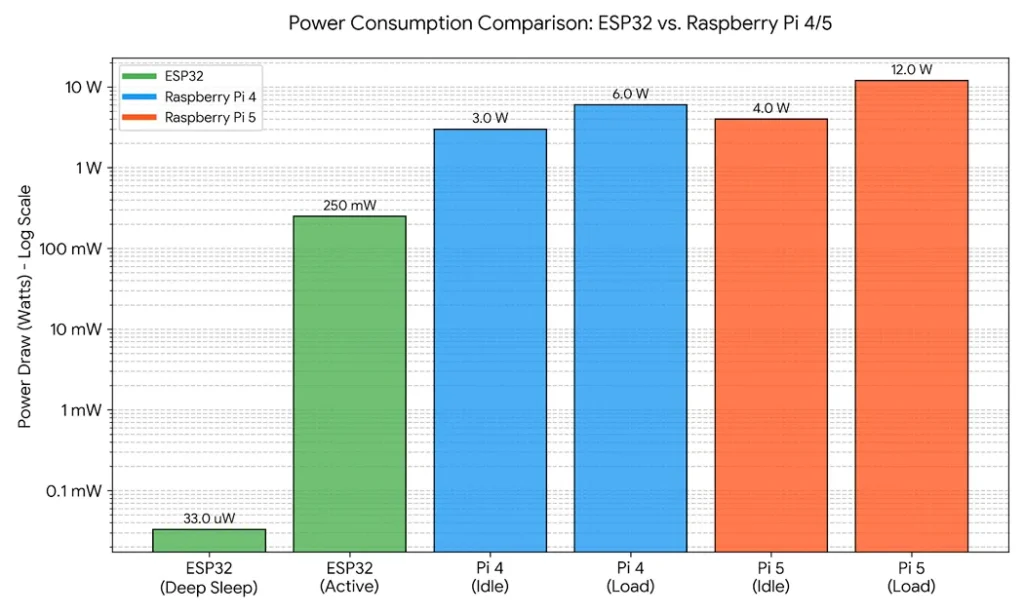
One of the most important aspects of choosing between the ESP32 and Raspberry Pi is power consumption . The ESP32 is designed with low powerusage in mind, capable of operating indeep sleep modeat just 0.01 mA of current consumption. This makes it an excellent choice for battery‑operated projects where power efficiency is crucial, such aswearable devices,remote monitoring systems, andsmart sensors.
In contrast, the Raspberry Pi, being a full‑fledged computer, requires more power. The base model of the Raspberry Pi 4 requires 5V/2.5A of power. This can increase if you attach peripherals like external hard drives, cameras, or displays. Raspberry Pi 5 improves performance and I/O but still consumes more power than an ESP32 in typical active use.
| Feature / Metric | ESP32 (MCU) | Raspberry Pi 4/5 (SBC) |
|---|---|---|
| Processor Speed | Dual-core 240 MHz | Quad-core 1.5 GHz - 2.4 GHz |
| Operating System | None (Bare-metal / RTOS) | Full Linux OS (Debian, Ubuntu) |
| Power Draw (Active) | ~0.25 Watts | 4.0 Watts to 12.0 Watts |
| Deep Sleep Support | Yes (10µA to 150µA) | No (Only Idle/Shutdown) |
| Best Use Case | Battery IoT, Sensors, BLE | AI Vision, Media, Local Server |
Quantifying Performance: Formulas for Embedded System Design
Engineers do not choose a board based on clock speed alone. They calculate power longevity and latency to meet project specifications.
1. Battery Life Estimation (ESP32 Advantage)
For battery-operated IoT devices, the estimated runtime is crucial.
T_Life=Battery Capacity (mAh) Average Current Draw (mA)
For a typical 2,000 mAh battery: The Raspberry Pi 4’s average draw (800 mA) gives ≈ 2.5 hours, while the ESP32’s average draw in Deep Sleep/Burst (approx. 5 mA) can yield ≈ 400 hours, demonstrating the fundamental use‑case difference.
2. Real-Time Latency & Jitter (ESP32 Advantage)
Real‑time systems require predictable, low latency. Jitter (the variation in latency) is the Raspberry Pi’s greatest weakness due to its Linux OS scheduler.
Tloop= Tread+Tcompute+Tactuate
The ESP32, running bare‑metal or FreeRTOS, achieves a near‑constant, low 𝑇 𝑙 𝑜 𝑜 𝑝 (often 10 ms). The Pi’s full OS can introduce non‑deterministic delays (high jitter), making it unsuitable for mission‑critical control loops..
Best Use Cases Based on Power Consumption:
- ESP32: Low-power, battery-operated IoT devices, remote sensors, wearable tech, and environmental monitoring systems.
- Raspberry Pi: Projects that involve continuous operation, require access to high-speed internet, or need to run complex applications, such as media centers or home automation hubs.
Troubleshooting Development Challenges: Expert Fixes
Professional development with these boards means anticipating their known hardware and software limitations. Troubleshooting correctly saves significant project time.
ESP32 Common Issues & Fixes
- Issue: Wi‑Fi Dropouts or Unstable Connection. Often caused by insufficient power during transmission spikes (Brown‑Out Reset). 500mAfor bursts. Add a decoupling capacitor (e.g.,100μF) near the power pins.
- Issue: Code Crashes Due to Limited RAM. Using large string buffers or complex libraries exhausts the 520KBSRAM. Fix: Utilize external PSRAM modules or switch from the easy‑to‑use Arduino framework to the more memory‑efficient ESP‑IDF(Espressif IoT Development Framework).
Raspberry Pi Common Issues & Fixes
- Issue: SD Card Corruption. Frequent power loss or writing logs can wear out the microSD card quickly. USB 3.0 SSDfor long‑term, high‑write applications.
- Issue: Overheating Under Load. Running AI models or high‑frequency tasks pushes the CPU past 80°C, leading to clock speed throttling (performance loss). Fix: Install passiveheatsinksand an activefan or purchase a case designed for improved thermal management.Which One Should You Choose for Your Project?Deciding between the ESP32and Raspberry Pi ultimately depends on your project’s requirements.
Choose ESP32 if:
- You need low power consumption for battery-operated devices.
- Your project revolves around IoT applications such as smart homes, environmental sensors, or connected devices.
- Real-time performance is crucial (e.g., sensor data processing or actuator control).
- Wireless communication(Wi-Fi/Bluetooth) is essential for your project.
Choose Raspberry Pi if:
- Your project requires high computational power or running a full operating system.
- You need to interface with peripherals such as USB devices, HDMI displays, or cameras.
- You want to create a media center, personal server, or desktop-like experience.
- Your project involves running complex software or multi-tasking, such as building a web serveror creatingeducational tools.
Industry Standards, Protocols, and Compliance
Professional product development requires adherence to global standards for connectivity and safety, which directly impacts board choice.
Wireless & IoT Protocol Standards
- IEEE 802.11 (Wi‑Fi): Both boards comply with Wi‑Fi standards. The Pi 4 uses the faster 802.11ac standard, while the Pi 5 supports faster Wi‑Fi variants; the ESP32 typically uses 802.11n.
- Bluetooth: The Pi 5 uses Bluetooth 5. x; the ESP32 supports both Bluetooth Low Energy (BLE) and Bluetooth Classic (4.2).
- IoT Messaging Protocols: The ESP32 is optimized for MQTT (Message Queuing Telemetry Transport) and CoAP (Constrained Application Protocol) the backbone of low‑power IoT networks. The Pi primarily uses standard HTTP/HTTPS for server‑side communication.
Operating System and Hardware Compliance
- Linux Kernel Compliance: The Raspberry Pi’s use of the Linux kernel provides stability and compliance with open‑source licensing standards.
- USB and HDMI Standards: The Pi’s compliance with USB 3.0 and HDMI 2.0 standards makes it ready for commercial display and peripheral integration without proprietary drivers.
- Regulatory Certification: For commercial products, choosing pre‑c ertified modules (like the ESP32‑WROOM‑32) simplifies FCC/CE regulatory testing, saving time and money.
Final Thoughts
In conclusion, both the ESP32and Raspberry Pi are exceptional boards that cater to dif ferent needs. The ESP32 is perfect for IoT applications, embedded systems, and real‑time performance with low power consumption. On the other hand, the Raspberry Pifamily (now including Raspberry Pi 5) offers a versatile computing environment that is more suited for tasks requiring higher processing power, multitasking, and peripheral connectivity.
Choosing the right device depends on the specific requirements of your project. For battery‑operated devices with minimal resource needs, the ESP32 is the better choice. If you’re looking for a full computing platform with the ability to run a variety of applications and interface with numerous peripherals, Raspberry Pi 5 is the way to go.
Whichever board you choose, both have a strong community of developers, plenty of resources. Endless possibilities for creating innovative projects.
FAQ
Q: Which board is better for IoT? A: The ESP32 is generally better for battery‑powered IoT devices because it has built‑in Wi‑Fi and Bluetooth, an ultra‑low Deep Sleep Mode (≈ 0.01 mA current draw), and is cost‑effective for sensor networks. Raspberry Pi is more powerful but consumes significantly more energy (4 W+ active draw), making it better suited for edge computing or AI tasks rather than simple, long‑term battery‑powered IoT nodes.Q: How do ESP32 and Raspberry Pi differ fundamentally? A: The ESP32 is a Microcontroller (MCU) with integrated wireless connectivity, d esigned for embedded systems that run custom, lightweight firmware (like FreeRTOS). Raspberry Pi is a Single‑Board Computer (SBC) with a full Linux OS, capable of running complex software, multimedia, and AI workloads.Q: Why can’t I use the Raspberry Pi for precise, real‑time control applications? A: The Raspberry Pi runs the Linux OS, which is not a Real‑Time Operating System (RTOS). The kernel scheduler can introduce non‑deterministic delays (jitter) in I/O operations, making the Pi unreliable for time‑critical tasks where the ESP32’s deterministic performance is essential.Q: What are the main reliability concerns for each board in long‑term projects? A: For the ESP32, the main reliability concern is Brown‑Out Reset (due to power spikes during Wi‑Fi transmission) and quickly exhausting the limited 520KB SRAM. For the Raspberry Pi, the biggest long‑term issue is microSD card corruption (due to frequent write cycles and sudden power loss) and overheating when running high‑load AI or server applications.Relevant Resources:
Related guides in this track
- New to IoT, Sensors & ESP32? Start with the complete iot, sensors & esp32 guide it indexes every tutorial in this track.
- ESP32 Getting Started: First Flash and WiFi Scan
- ESP32 GPIO and Strapping Pins: What Not to Use
- ESP32 WiFi That Never Dies: Reconnection Strategies
- Calculate the numbers: battery life calculator · LM317 calculator
Practical example
Take the first measured row from the table above. Feature / Metric corresponds to ESP32 (MCU) under Raspberry Pi 4/5 (SBC). Reproduce that configuration at the bench, record your own value beside it. Any meaningful gap tells you which tolerance or assumption deserves a closer look. Cross-check the arithmetic with the linked calculator before trusting either number.
Where to go next
- The complete iot, sensors & esp32 guide: IoT, Sensors & ESP32 complete guide
- Read next: lorawan for beginners: long-range iot without wifi
- Also in this track: antenna basics for iot: wavelength, gain and matching
- Continue with: biomedical sensors: how wearables measure the body
- Calculate as you go: battery life estimator · LM317 regulator designer · wire gauge checker
- Bookmark this page against the day a measurement surprises you. Most readers return to the table and the mistake list first, and that is the correct order.
Frequently asked questions
Industry Standards, Protocols, and Compliance? Professional product development requires adherence to global standards for connectivity and safety, which directly impacts board choice.
- IEEE 802.11 (Wi‑Fi): Both boards comply with Wi‑Fi standards.
Last updated 23 August 2026