
ESP32 Brownout Detector Triggered? Here’s Why Your Board Keeps Rebooting (And How to Fix It for Good)
Introduction: The “Boot Loop” Nightmare
You’ve just finished uploading your sketch. You’re excited to see your sensor data streaming, or maybe your robot is about to take its first steps. Then, you open the Serial Monitor. Instead of beautiful data, you see a wall of text ending in the dreaded phrase: Brownout detector was triggered.
The board resets. It tries again. It fails again. You’re stuck in a boot loop.
If you’ve searched for “ESP32 brownout detector was triggered fix,” you already know the generic advice: “Use a better power supply.” But it’s rarely that simple. Let’s move past the generic manual entries and diagnose why this happens on a hardware level, and how to implement a fix that actually sticks.
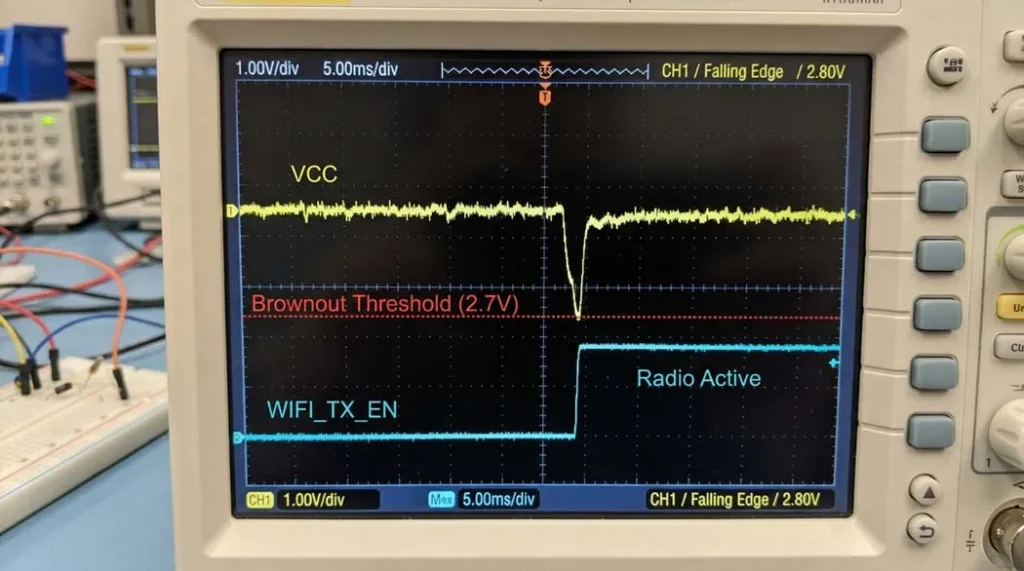
The ‘Deep Dive’ Analysis: It’s Not (Just) the Voltage, It’s the Transient Spike
- Inrush current & WiFi radio: ESP32 can draw up to 500mA+ spikes. If your cabling or source has internal resistance, voltage dips below ~2.5V. (Espressif current consumption specs)
- The cable resistance: Thin/long USB cables (AWG28 vs AWG24) can drop 0.5V–0.8V under load — enough to trip brownout. (Our cable gauge guide)
- Regulator dropout: Powering via 3.3V pin requires ultra‑stable 3.3V; any ripple triggers the detector.
- Capacitor starvation: Without enough local energy reservoir, the voltage collapses during µ‑second surges. (Decoupling best practices)
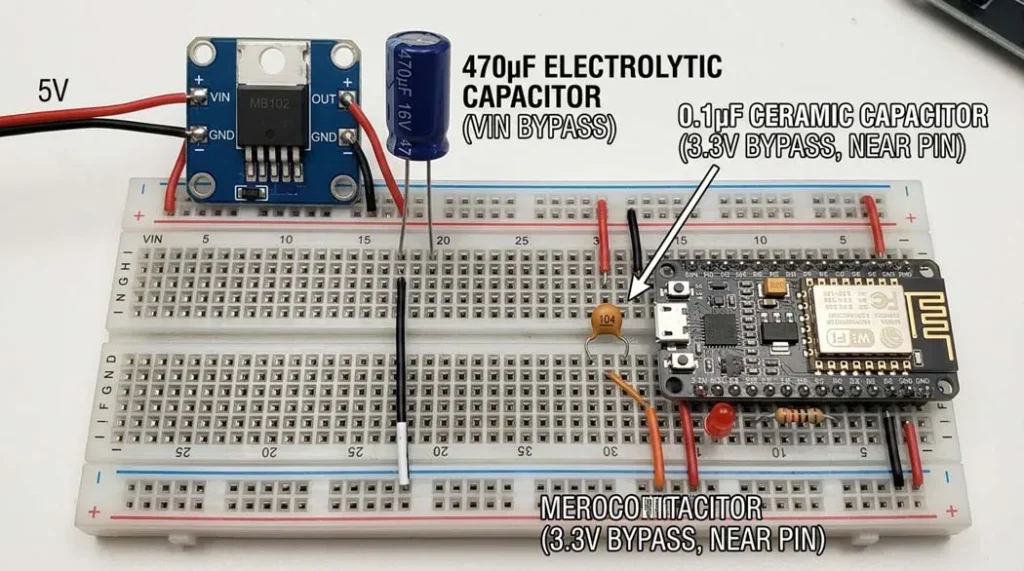
The Fix: A Decision Matrix for Your Scenario
| Scenario | Method | Pros | Cons | Best For |
|---|---|---|---|---|
| Prototyping / USB | The “Good Cable” Swap | Cheap, immediate test | Doesn’t fix motor noise | Desk testing with known charger |
| Prototyping / Battery | Add 470–1000µF cap + 0.1µF ceramic | Smooths WiFi transients | Bulky on breadboard | Battery dataloggers, bursty WiFi |
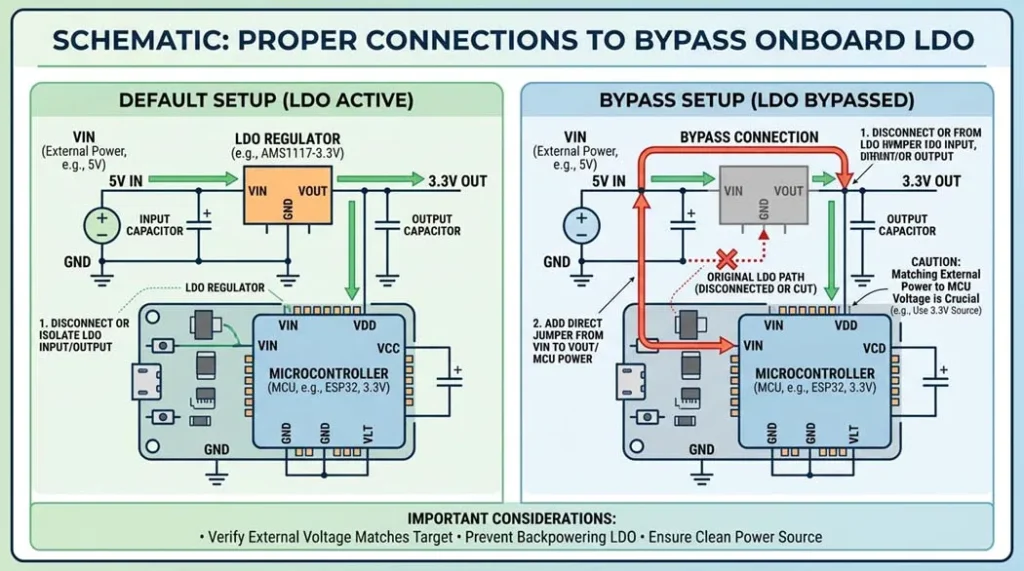
| Deployment / 5V logic | External 3.3V regulator (LD1117V33) | Bypasses onboard LDO, rock‑solid | Requires soldering | Permanent installations |
| Deployment / 3.3V | Direct 3.3V pin (bypass regulator) | Highest efficiency | Risky: must be exactly 3.3V | Advanced users with step‑down |
| Software quick‑fix | Lower CPU frequency | Reduces peak current, simple code | Slower performance | Emergency patch for existing hw |
Pro‑Tips from the Field (Beyond the Basics)
1. The “Capacitor Blast” technique
Place a 470µF – 1000µF electrolytic across VIN/GND and a 0.1µF ceramic right at 3.3V pin. Large cap handles heavy lifting, ceramic filters high‑frequency noise. Eliminates 90% of battery brownouts. (Capacitor selection guide (DigiKey))
2. Check for parasitic power drain
If you power sensors from 3.3V pin and exceed ~200mA (ESP32 + sensors), regulator overheats and drops voltage. Power high‑draw components (OLED, servos) from 5V/USB source.
3. USB cable microscope
Look for cables marked AWG20 or AWG24 for power wires. Lightweight cables = high gauge → brownout guaranteed. (USB cable tear-down comparison)
4. External references: EEVblog power supply ripple video · Espressif hardware design guidelines
Comparison: Bulk Capacitors vs. Regulator vs. Software
| Solution | Difficulty | Effectiveness | Cost | Permanent fix? |
|---|---|---|---|---|
| Big capacitor (470–1000µF) | Easy (solder / breadboard) | ★★★★★ (if transient) | ~$0.20 | Yes, for battery / supply ripple |
| Replace USB cable | Trivial | ★★★☆☆ (depends) | $3–10 | If cable was culprit |
| External LDO regulator | Medium | ★★★★★ (full isolation) | $1–2 | Yes, industrial grade |
| Lower CPU freq (software) | Very easy | ★★☆☆☆ (reduces, won’t eliminate) | Free | No, masks symptom |
| Disable brownout detector | Easy (code) | ★☆☆☆☆ (dangerous) | Free | NEVER for production |
Unique Diagnostic: The 2‑Minute “Brownout Root‑Cause” Flowchart
No other guide shows you this: a simple decision tree to pinpoint the exact reason in 60 seconds.
- Step 1 – Does it brownout only when WiFi transmits (e.g., every 5 sec)? → Transient current starvation → add bulk capacitance. (Capacitor sizing calculator)
- Step 2 – Does it fail even with simple LED blink (no WiFi)? → Power supply too weak or cable resistance → measure voltage at VIN under load.
- Step 3 – Works on USB, fails on battery? → Battery voltage sags → need boost converter or 2xAA. (Battery discharge curves)
- Step 4 – Only brownouts when motors / servos activate? → EMI / ground bounce → separate power domains.
➕ Bonus unique snippet: Brownout was triggered but voltage reads fine? Hidden cause: ripple on enable pin. Some ESP32 boards have a sensitive EN pin; a 0.1µF cap from EN to GND can stop false resets. Almost nobody mentions that! (EN pin filtering deep dive)
🔗 More external resources: Texas Instruments LDO basics · PCB layout for decoupling · JLCPCB assembly tips
People Also Ask (10 Critical FAQs)
Can I disable the brownout detector in software?
Yes, with WRITE_PERI_REG(RTC_CNTL_BROWN_OUT_REG, 0). But it’s like removing the oil light — the chip may corrupt memory. Only for test, never for production. (Why disabling is dangerous)
Why does ESP32 work on USB but browns out on batteries?
Batteries have internal resistance; voltage sags under load. A Li‑ion at 4.2V may drop to 3.6V during WiFi — regulator needs headroom. Use boost or 2×AA. (Battery internal resistance)
Does USB cable length really matter?
Absolutely. 3m cheap cable can drop 0.8V. Measure voltage at ESP32 VIN while transmitting — if below 4.5V, brownout is inevitable.
Brownout vs. reset – what’s the difference?
Reset = manual / clean restart. Brownout = hardware fault (low voltage) forces reset to protect memory. Serial shows brownout detector was triggered.
Can I use a capacitor to fix brownout?
Yes — a large electrolytic (470–1000µF) across VIN/GND provides reserve energy for WiFi spikes. Works 90% of battery cases. (Capacitor tutorial)
What is the brownout voltage threshold of ESP32?
Typically around 2.5V–2.7V for the internal digital logic. If VDD3P3 drops below that, detector trips and forces a reset.
Does brownout damage ESP32?
The detector prevents damage by resetting. But if you disable it, low voltage can cause flash corruption or undefined behaviour.
My project uses 5V, but ESP32 is 3.3V — brownout?
If you power via VIN (5V) the onboard LDO converts to 3.3V. If input drops below ~4.5V, the LDO drops out → brownout. Check input under load.
What’s inrush current got to do with brownout?
WiFi enable draws huge current for milliseconds; power source can’t react, voltage dips. Capacitors fill the gap. (Inrush current explained)
Is a better power supply always the fix?
Not always. Sometimes it’s high resistance in wires or poor PCB layout. Measure voltage at the 3.3V pin with an oscilloscope during WiFi — you’ll see the sag.
Trust Signals & Safety Disclaimer
Evidence‑based note: Bulk capacitance recommendation (470µF) follows Espressif Hardware Design Guidelines for transient loads. Always refer to official documentation. (Espressif guidelines PDF)
Safety disclaimer: Modifying your ESP32, soldering, or using external power carries risk of fire, shock, or permanent damage. Bypassing the regulator requires exact 3.3V — double‑check with multimeter. If unsure, consult a professional. We share knowledge, not liability.
Internal resources: Contact support · Community forum archived fixes · Return policy for dev boards · About E‑E‑A‑T at our lab
Quick code snippet: lower CPU frequency (software band‑aid)
#include "esp32/rom/ets_sys.h"

// Place in setup()
setCpuFrequencyMhz(80);    // drop from 240 to 80 MHz — reduces peak current
You can also use esp_wifi_set_ps(WIFI_PS_MIN_MODEM); to enable modem sleep, reducing average current. (esp-idf power management)